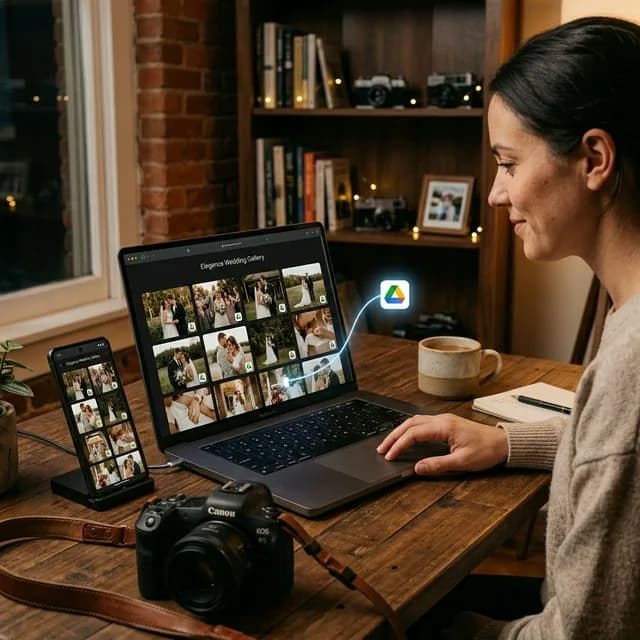
More photographers in Indonesia are searching for how to create a client gallery because raw storage folders no longer feel like a premium standard. Clients want a cleaner experience, a faster workflow, and something that is easy to open from their phones.
The problem is that many photographers assume a client gallery means changing their whole workflow, re-uploading hundreds of images, or subscribing to an expensive platform. In reality, with the right system you can create a client gallery directly from the folders you already use.
What Is a Client Gallery?
A client gallery is a private online gallery used to present photos to a client. It is not only about display. A good client gallery also helps clients review, choose, and sometimes download their photos in a way that feels far more professional than a normal storage link.
A proper client gallery usually includes:
- a layout that is comfortable to open on mobile,
- a private link that can be shared directly with the client,
- access protection when needed,
- selection tools for proofing and final editing.
If you are still new to proofing, What Is Client Proofing? will help explain the context first.
Why a Normal Google Drive Folder Often Feels Weak
Google Drive is excellent for storage, but it is not always ideal for presentation. When you send a raw folder:
- clients see a list of files instead of a clean gallery,
- camera filenames such as DSC_1201 or IMG_4832 feel confusing,
- photo selection becomes slow because clients must write filenames manually,
- your studio brand disappears behind a generic interface.
That is why photographers increasingly look for a way to create a client gallery that still stays practical while feeling more premium.
What to Prepare Before Building the Gallery
Before you share anything with a client, clean up the project first.
1. Organize the folder
Make sure the gallery only contains images that are ready to be reviewed. Remove test shots, blurred images, and any frame you do not want a client to see.
2. Decide the goal of the gallery
Not every client gallery exists for the same reason. It may be used to:
- let clients choose which images you will edit,
- show a final set,
- provide a private download gallery,
- create a premium presentation after the shoot.
When the purpose is clear, the selection limit and communication flow become easier to design.
3. Decide the selection quota
For weddings, preweddings, family sessions, and graduations, a package often includes a fixed number of edited images. Decide that number early so clients do not get confused and you do not end up negotiating through chat.
How to Create the Gallery
This is the simplest workflow to follow.
1. Keep storing the photos where you normally work
There is no need to change your core habit. If your projects already live in Google Drive, keep that structure.
2. Connect that folder to a client gallery platform
Use a system that can read photos directly from your working folder. This is much more efficient than tools that require a second upload, especially when you deal with hundreds of files.
3. Set the gallery access
Before sending it, configure the basics:
- project title,
- shareable gallery link,
- password or login if needed,
- photo-selection limit.
These simple settings are enough to turn a normal folder into a productized experience.
4. Share the gallery link with the client
Once it is ready, send the gallery via WhatsApp or email. Instead of opening a technical folder, the client opens something that feels closer to a premium visual experience.
5. Receive the final selections in a clean format
This is where the biggest time savings happen. A good client gallery lets the client tap the photos they want, then sends the final selection back to you clearly and cleanly.
If you want an example connected to Drive, read How Clients Choose Photos from Google Drive.
Common Mistakes When Building a Client Gallery
Even with the right tool, photographers still make the experience harder than it needs to be.
Sharing too many raw images
Clients do not always need to see every single frame. Too many options slow down decisions.
No selection limit
Without a visible limit, clients tend to choose too much and you have to correct expectations later.
No short explanation
Even if the gallery looks simple, it is still smart to explain:
- how many photos can be chosen,
- when the selection deadline is,
- what happens after submission.
Choosing a platform with poor mobile usability
Most clients will open the gallery from a phone. If the experience feels heavy or confusing, proofing stalls.
Who Should Use a Client Gallery?
This workflow is especially useful for:
- wedding and prewedding photographers,
- family and maternity photographers,
- graduation photographers handling high volume,
- personal branding studios,
- event teams that need faster photo selection.
The more files you have and the more often clients must choose images before final editing, the more valuable a client gallery becomes.
FAQ About Creating a Client Gallery
Do I have to upload all the photos again?
Not always. If the system connects directly to Google Drive, you can build the gallery from the folder you already use.
Is a client gallery only for large studios?
No. Freelancers and smaller studios often feel the benefits fastest because a client gallery saves so much admin time.
Is a client gallery the same as sending a Google Drive link?
No. Google Drive is storage. A client gallery is the presentation and selection layer built on top of that storage.
Conclusion
Creating a client gallery is not as complicated as many photographers assume. The key is to choose a system that matches your existing workflow, does not force a second upload, and gives the client a cleaner experience.
If you want a client gallery that feels neat, works well on mobile, and can be used immediately for client photo selection, try PilahFoto here.